DIY
ssh portfolio.vedsite.com
paste into your terminal and type yes to confirm the connection. trust me, i don't want your data
overview
This is my website, but accessible over SSH. When you connect to port 22, you receive a version of my homepage at vedsite.com, but in the terminal. I tried to be consistent with the DVD-player-esque animation style, with the squares bouncing off the edge. Each square maps to a different section of my portfolio (about, projects, experience, misc) and morphs into a different character every time it hits a wall. You can press 1 through 4 on your keyboard to navigate into each section, or just sit by and watch the square bounce around (don't sit idle too long, I have a timeout set for 10 minutes).
visuals
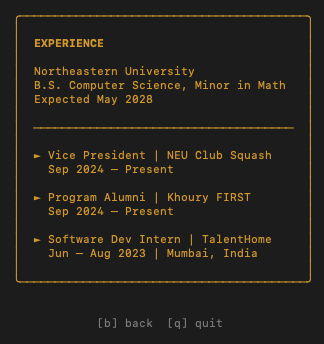
1-4 to open a subpage,
b or esc to go back, q to quit. Each subpage
shows the section title and links back to the real website.
construction
The app is written in Go using the Charm stack which is a set of GitHub libraries specifically built
for terminal UIs over SSH.
Wish handles the SSH server: it listens on port 22 and bootstraps a
fresh terminal UI for each incoming connection.
Bubble Tea is the TUI framework that drives the render loop:
an Init → Update → View cycle running at 50ms ticks for smooth animation.
Lip Gloss handles all the styling including colors, bold text, positioning in the
terminal.
The animation loop works like a simple physics engine: each square has an (x, y) position and a velocity vector (vx, vy). With every tick, positions update and bounce off of terminal edges. On collision, the square's character morphs to the next one in the cycle.
architecture
The Go binary runs directly on my Raspberry Pi 5 at home, listening on port 22. Since the Pi sits
behind my home network, an Oracle Cloud free-tier VM acts as the public entrypoint: socat relays
incoming TCP on port 22 to the Pi over Tailscale, so ssh portfolio.vedsite.com routes
into the Wish server without exposing my home IP. The Pi's admin SSH runs on a different port so
the portfolio can own port 22. Cloudflare handles DNS as an A record on DNS-only mode pointing
at the Oracle VM, since SSH cannot be proxied on the free tier.
Source? The code is on my GitHub.
The main logic is a single main.go
file: model, update loop, view renderer, and SSH server setup all in one place.